Friday, March 31, 2017

Switches

Week Twenty-eight

(or Switch On, Switch Off)

Well, as I said last week, this post is about switches. I'll explain what they are in AIM< and how they work, show the concept art, 3D models, and HUD icon throughout the post and in the gallery at the end.

Switches are another mechanic that we tested in a build that I mentioned a couple weeks ago. I had gotten some feedback some weeks back from our producer/professor Jay Little that we needed to implement a mechanic that gave players some tangible feedback for progress during game play.

I started doing some research and discovered a Gamasutra article written by Orcun Nisli that nicely covered general elements that are found in platforming games. In "The Path to Monochroma: Platformer Design Elements", Nisli talks about the idea of "locks and keys". Players find keys while playing through levels to unlock closed portions of levels and progress through the game. The purpose of this design is twofold. Players want to explore, being motivated by the goal of finding keys. Also, when doors are unlocked the previously closed off level sections are opened giving the player a sense of measurable progress.

A while back, Sihneng Thao, one of the modelers on the team, told me an idea he had for using the AIM< drones as batteries during game play. I merged Sihneng's idea with the "lock and key" concept to create the switch mechanic for AIM<.

The concept for the mechanic is that there are "switch" devices all around in AIM<, which are essentially battery bays. Once a drone is piloted into a bay, it charges the device, switching on dynamic level elements such as moving platforms and doors. Players will now be able to measure some of their progress through the level via the switch devices.

I drew two different switch concepts; one closed and one open. The closed switch is a bit like a garage. Once the drone enters the bay, a door closes keeping the drone safe and the device powered. A drawback is that this switch can only be entered one way; through the open door.

The open switch can be entered from the top and sides but once the drone interfaces with the device, it's left vulnerable to enemy fire. Players will have to make sure to clear the area of enemies before using or else risk losing their drone.

For both switches, once a drone activates the device, a light beam shoots out towards the sky so that players can see a powered switch from most places in the level. I also just finished making a HUD icon to show players where they are in relation to a nearby switch.

Sihneng Thao and Jon Worman just got the models finished for both switches this week. Check them out in the gallery below!

That's all for this post. Check back in a week or so for more AIM< developments! Have an awesome weekend!

Closed Switch Concept by Aram Wahler


Closed Switch Model by Jon Worman


Open Switch Concept by Aram Wahler


Open Switch Model by Sihneng Thao. Drone Model by Daniel Bodunov.


Saturday, March 25, 2017

Rocket

Week Twenty-seven

(or Up, Up, and Don't Die!)

I intended to write and publish this post last week but time flew by before I knew it. So, anyway. This post will finally reveal some information and art for the power-up we tested in our last build. The art featured in the post is pretty recent. I drew the concept a couple weeks ago and Jon Worman just put finishing touches on the model in the past couple days.


The power-up is called "Rocket". Once player's pick this up at the end of one of the levels, the mech is able to make Rocket Drones and Rocket Ammo. Rocket Drones have a lot of control in the air and are able to boost themselves vertically to greater heights than other drones. Players will be able to use them to reach out-of-reach places and when aerial maneuvers are needed. Rocket Drones can also self-destruct, dealing damage to nearby enemies. They will explode if too much damage is received.

Power-ups have come a long way from the initial concept. The last time I posted some art for them was November last year. At that point, I was planning on having players pick up finite power-ups and manage when and where they would be used. Now that sort of resource management is met by the current scrap/energy resource mechanic and players keep the power-up once it's acquired.

Not only did power-ups in general go through big conceptual changes, specific power-ups like Rocket changed quite a bit as well. Initially, I wrote Rocket to be all about vertical movement and very little aerial control. Another power-up called "Glider" would be about horizontal movement. The reason behind splitting all of this functionality up was to have a number of large rewards that could be given to players when they beat levels or game-play challenges.

The fragmentation turned out to be a bit clunky and overlapped too much in testing. We decided to combine the horizontal control with Rocket and make it a more functional power-up. Rocket now feels really great to use and I think we will have some fun challenges in store for players.

We're getting further and further along in development, which means I'll have some new stuff to show next post.

Have a great rest of the weekend!

Rocket Concept Art by Aram Wahler


Rocket Model by Jon Worman. Drone Model by Daniel Bodunov.


Wing Power-up Concept by Aram Wahler

Friday, March 10, 2017

Progress

Week Twenty-five

(or Build 3ish?)

Violent Traversal just completed our "Mech Powers" build of AIM< with the goal of testing...surprise! The mech model and a power-up. We haven't put power-ups in a map since last October, where we tested out our initial power-up designs. So this build was a pretty big deal.

It turned out to be quite successful! We didn't have as many hands test this build as the two previous versions, but our producer (and professor), Jay Little, was pleased with the progress and we got great feedback from everyone that played.

The past couple weeks I've talked about the design decisions and process behind building the UI for AIM<. One of our programmers, Chloe Terry, worked very hard to get the UI implemented for the current build and make any changes that needed to be made. It looks and functions awesomely so far! More tweaks and adjustments will continue to be made but it works very well and is tremendously helpful in testing and playing. We were able to understand much better what was happening during game play and feel less disoriented. A working UI really helps understand what's working and what needs fixed.

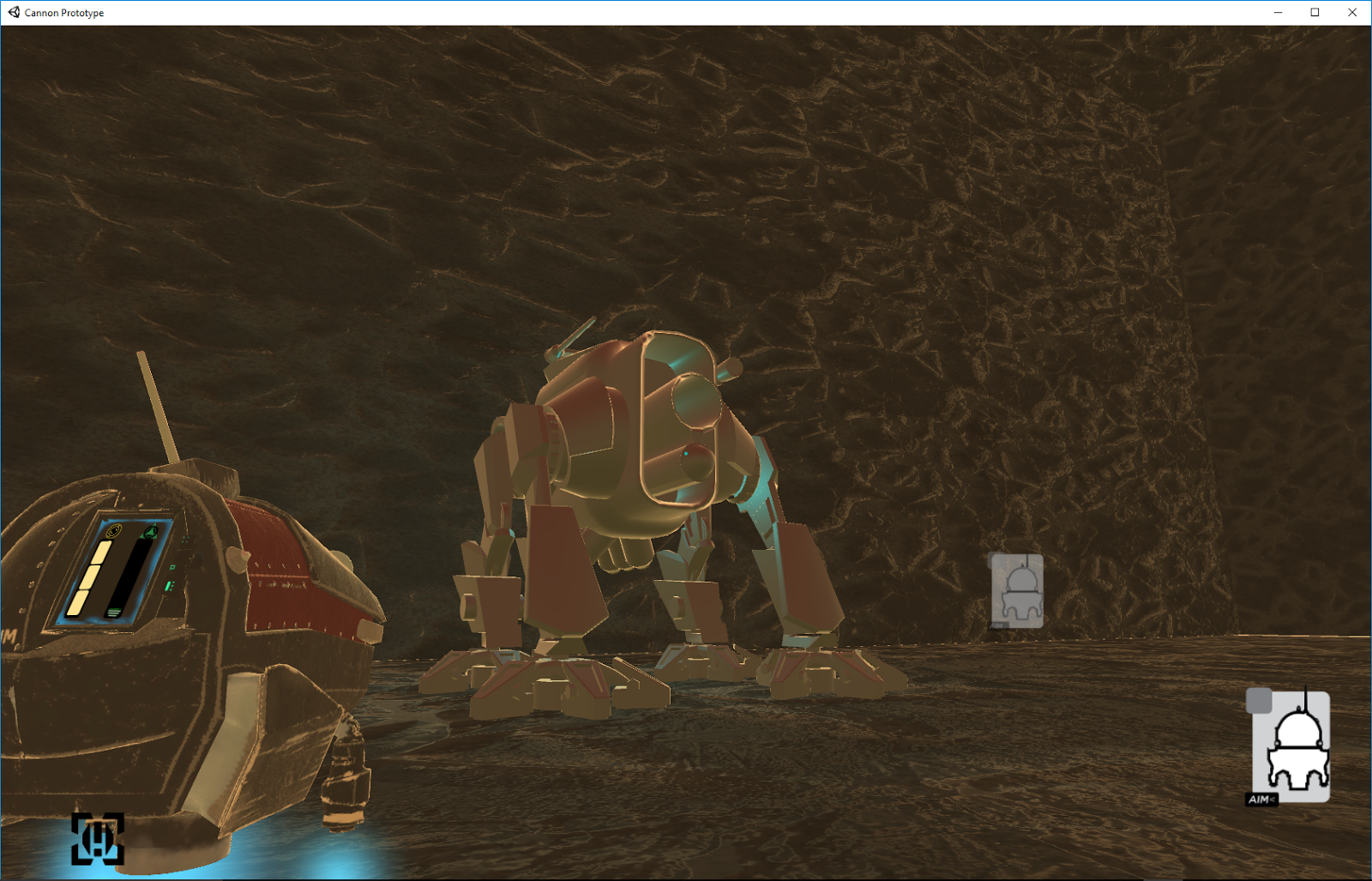
As you can see from the screenshot, an updated mech model made it into this build! Dan Bodunov has been hard at work turning the mech concepts into a final model for our game. Soon, he will have the animations completed and move onto texturing the completed model, creating the final, massive juggernaut that you will be able to control when the game is released.

This mech model is now correct size and replaces the placeholder being used previously. Now we are better able to understand the scale and proportion between the mech, drone(s), and level geometry, allowing for more accurate white-boxing of levels.

Speaking of levels; Steven Lindbloom designed and white-boxed the level shown in the screenshots. He used geometry created by Jon Worman and switch objects programmed by Marcus Tolbert (also used in the last build) to design a fun and engaging level focused on showcasing a power-up. Construction of the level also served as a test for a modular pipeline we are adopting to create the rest of the levels for AIM<.

The level is a lot of fun to play. Steven plans to continue working on it and refining it. I'll record some game-play footage of the next version for a future blog post.

I've mentioned a few of the developers from Violent Traversal involved in creating the "Mech Powers" build, but everyone on the team has in some way or another had a hand in creating what you see in the screenshots. Take a look at the facebook page to see blog posts by the other members and see what they're up too. Each member of the team plays an integral and irreplaceable role in creating AIM<.

Next post, I'll be talking about the power-up tested in the "Mech Powers" build. A near-future post will cover the "switch" objects and collaboration between modelers Jon Worman, Sihneng Thao, and I.

Check back soon and have a great weekend!

AIM<: Mech Powers Build Screenshots Featuring work by everyone at Violent Traversal.


Friday, March 3, 2017

Shapes

Week Twenty-four

(or UI II)

I hope you've had a great week! I thought I would talk a little bit more about the UI since I'm still working on certain aspects and continuing to develop artwork. I decided to show some of my sketch pages this week in the gallery below. Both pages show my UI ideation process on paper.

Last week I laid out the fundamental concepts behind the UI I'm designing for AIM<. This week I'll go into a little more detail regarding one of the most enjoyable parts to develop; the artwork.

The artwork is primarily icons. This decision is largely influenced by design conventions already established by shooters and further enhanced by the TCG (trading card game) influence I mentioned near the end of my blog post last week.

Beginning with the earliest shooters, specific iconography is developed to quickly communicate to players vital information, like health and ammo, at a glance during frenzied action sequences. Many shooters have their own iconography. Shape language is typically quickly established early in the game so that later, during more difficult levels, players can quickly identify important pickups, power-ups, avatar status, etc.

In AIM<, players will be able to see at a glance where resources and threats are and quickly make decisions. I designed the icons with high contrast to stand out from the  environment. Also, each icon uses shape language that varies greatly from one another to avoid confusion. The final color schemes for the UI will further enhance recognition.

TCG cards use a similar logic for iconography as shooters but take the concept a little further. It's common for TCGs to sum up complex functions with a single icon. Icons are even able to be strung together to form even more complex function statements. Iconography is key to card designs since space (or real estate) is often limited to a very small area. Important information must be able to be communicated at a glance without competing too much with illustrations, or breaking aesthetic uniformity and consistency.

I created a couple variations for many of the elements featured on the "cards" in AIM<, seeking to establish a uniform aesthetic among the different icons. All of them need to look like they fit in the same game. I also had to be sure that each icon could be resized and used at different locations consistently, without having to change any of the elements that compose the icon. Some basic graphic design knowledge has been very helpful when making these decisions.

Game design, I've learned, really is a multi-disciplinary exercise. Every course I've taken has been influential in some form or fashion.

I look forward to sharing more with about the design process behind AIM< next week! Have an awesome weekend!

AIM< UI Concept Sketches Page 1 by Aram Wahler


AIM< UI Concept Sketches Page 2 by Aram Wahler


Friday, February 24, 2017

UI

Week Twenty-three

(or Work, Work)

Violent Traversal has been hard at work developing AIM< over the past couple weeks. As I talked about in my last post, we recently established a concrete mission statement for the game. We also prepared for and conducted another play-test, specifically addressing player movement, controls, and moving platforms. All of the recent developments paved the way for me to start developing a more robust UI (user interface).

I discovered through research and analyzing other games, that UI design and control schemes are closely tied to one another. Both systems allow players to interact with a game and receive feedback, essentially forming the connection between the players physical presence and digital avatar. Often, controls and UI are integral to the way a game "feels", significantly influencing a player's decision to interact. So it's only natural that as controls and movement were addressed, I was better able to continue designing the UI.

Many games feature a UI design referred to as a HUD (heads up display), which displays heuristics to players on an invisible border between the audience and the digital game space. It's a fairly intuitive method for giving players the information they need to see without any obstructions. Clarity is key for the audience successfully interacting with a game.


The traditional HUD-style approach has been used since early arcade games and is still pretty common in many modern games. Part of the reason the design has been used so long is due to the immediacy of the information provided by the design.

Another UI type is "diegetic". The term "diegetic" is borrowed from film and other entertainment design and refers to sound that exists within the space a narrative is taking place. Like music played by the jukebox in a bar scene, for example. When used referring to a game's UI, the term applies to elements that are present in the environment for both the characters in the game and the player experiencing the game as a part of an audience. When implemented well, this design provides information clearly in an immersive manner, which allows the audience to stay connected to a games narrative. The design tells the player what they need to know to play without breaking the "fourth wall".

What does all of this mean for AIM<? Well, I came to the conclusion that a blend of different UI designs would be appropriate for our game. I designed some elements as diegetic; like the resources a player currently has stored and mech damage. Information on currently deployed drones and their durability or "health", is conveyed to the audience in a more traditional HUD fashion.

Even though I chose to design certain aspects of the UI  as a traditional HUD, I borrowed design language from other games that might not immediately suggest "HUD". When AIM< players select ammo or look to see what drones are already deployed, the interface looks like a card from a TCG (trading card game). The elements are arranged to communicate a unit's (the drone or shell) resource cost and reflect the current state of a deployed drone. I appreciate the way cards from TCGs communicate heuristics to players immediately and concisely. I wanted to bring some of that beautiful design and efficiency into AIM<.

The most important function of a UI is communication. If the player's needs aren't met by the UI, a beautiful or technically impressive game will be crippled and unplayable. Players quickly stop playing when frustrated by a lack of feedback and/or poor controls. Games don't exist without players, so designing a solid interface and controls is imperative.

That's all for this week. Thanks for reading and check back for more soon!

AIM< UI Concept by Aram Wahler


AIM< UI Concept Revision by Aram Wahler

Saturday, February 4, 2017

Goals

Week Twenty

(or Again, You Aren't Missing Something)

It's now the second week of the semester and I'm hard at work on AIM< along with the rest of Violent Traversal. So far the past couple weeks have been a flurry of catching up on what everyone's been working on and plotting out a tentative roadmap for the next 12-ish weeks of development until we publicly demo AIM< gameplay at SGX17.We are planning to have playtest events, which will be detailed on the AIM< Facebook page.

Over break I worked on some concepts for the cannon's (now a "mech") leg design as well as design document odds and ends. See the gallery below for a look at the mech art.

The past couple weeks have included work on textures, models, mechanics, gameplay, and level design. On Monday we will be presenting the current state of AIM< to our producer and adjusting elements based on his feedback.

In my first blog post, "Initial Game Design and Ideation", I talked about the nature of AIM< as a capstone game design project at UW Stout. Fall semester can be summarized as a lot of ideation and pivots. Spring semester heralds the second "half" of the course and a bit of a shift in focus. AIM< now has a set mission statement, which will be used as the goal by which further decisions are made. I'll be trying to focus my blog posts more on the reasons behind the game design decisions I'm involved in and how matches up with the mission statement. Ideation still continues but there won't be anymore pivots since the endgame is set.

So what does a mission statement mean in game design? In a nutshell, the mission statement is the essential overall elements that create a game's identity. My professor here at UW Stout, Jay Little, teaches that a game's mission statement is three things; who you (the player) are, what you do, and how do you win. It should be short enough to explain what the game is as a concise pitch. The mission statement I wrote for AIM< looks like this:
"You (the player) control a mech that shoots projectiles and drones and seek to destroy an AI."
The mission statement can be expanded upon with details for the "back of the box" marketing bullet-points. My working version for AIM< so far:
"Take control of a futuristic mech able to launch drones and fire projectiles created out of recycled scrap materials. Gain the ability to create different types of drones and projectiles through power-ups.  
Experience compelling platforming gameplay where each shot fired reveals more possibilities through the planet’s dangerous terrain. Drones and projectiles are not just weapons but tools to provide solutions to challenges.  
The mech, drones, and projectiles all rely on one another. The mech creates specialized drones and fires projectiles. Drones collect resources, can be used as batteries, and explore out-of-the way places. Projectiles turn certain objects into scrap, siphon energy, and send resources back to the mech or a drone.  
Explore varied environments across the planet’s harsh surface, through claustrophobic caverns and an abandoned settlement.  
Use the mech’s resources wisely to outwit malicious technology and survive devastating environmental hazards." 
As a game designer, my goal with the mission statement and "back of the box" blurb is to give a potential audience enough info to decide whether to play the game.

Thanks for reading and have a great weekend!

AIM< Mech Leg Ideation by Aram Wahler

Friday, December 9, 2016

PR

Week Twelve

(or POSTER! poster poster poster)

Tonight our dev team, Violent Traversal, is showing some of the progress made on developing AIM< at UW Stout's Game Expo (SGX). SGX is a place for Stout student to show games they've made in classes or as independent projects. There's a large variety of different games genres, both digital and physical, on display. The students who've made each game are usually there to demo the games, show trailers, posters, etc., and answer questions. SGX signals the end of a semester and allows us to show our work to the public.

This week our whole team was getting ready to show off AIM< at SGX.16. One of my jobs besides Lead Game Designer, concept artist, and audio, is PR. I spent the past couple days putting together an advertisement poster, process poster, and sell sheet. I also did a quick update to the cannon concept. See the gallery below for an image.

The first poster is what you'd expect. I found a visual way to talk about the most important elements of the game and create some excitement for the final product. It's been a while since I took my graphics design courses but I really enjoyed them so working on this portion of the project was a lot of fun. One of the things that stuck with me from my coursework is that posters should have some levels of information. The audience gets the most important information from far away, so that info is the biggest. They get hooked and drawn in to find out more. Contact info, release dates and so on are then the smaller elements. Take a look at one of the final versions in the gallery below!

I designed our process poster to help save time in printing out a bunch of different sheets with concept and ideation art. The audience can take a look at one poster and see a bunch of the work leading up to the current version of the game.

The last PR item I designed is a sell sheet. Basically, a sell sheet or one sheet is an 8.5 x 11 piece of paper that contains all of the most important information about a game. It has to sell the person reading the information on the idea. It's important to make sure the language is concise and creative while maintaining integrity in expressing the final product goals. Sort of a balance between technical writing, creative writing, and graphic design. I put an image for one of the final versions in the gallery below.

Finally; I updated the Facebook page banner and profile pic. The profile picture now features our team's logo. Check it all out on our AIM< page! Either tonight or tomorrow I'll have some photos of the team at SGX.16 as well.

Have a great weekend! If you're up north like us; stay warm!

AIM< Process Poster by Aram Wahler


AIM< Poster by Aram Wahler


AIM< Sell Sheet by Aram Wahler


Updated Cannon Concept by Aram Wahler